- Fixed a bug where gists with no files and no description would break the tree view from loading
- Introduced the
GistPad > MCP > Resources: Include StarredandGistPad > MCP > Resources: Include Archivedsettings
- Added
GistPad: Clone Directorysetting, which allows you to control the name of the directory that gists are cloned into (when running theClone Repositorycommand on a gist) - Fixed a bug with uploading binary files to a gist
- Added
GistPad: New Notecommand available in the command palette as well as the tree view - Added
GistPad: Auto SaveandGistPad: Auto Save Delayconfiguration settings - Added
GistPad > Wikis > Daily > Filename Formatsetting to customize the filename format for daily wiki pages independently of the title format - The
Open Gist as Workspacecommand no longer adds the gist to theOpen Recentlist in VS Code
- The editor toolbar now displays an icon (globe) for opening the current gist file in your browser (either GitHub or GistPad.dev)
- The
Copy GitHub URLcontext menu (available in theGiststree) now copies the URL to the "friendly" page vs. the "raw" contents. - Wiki repos can now be created in orgs as opposed to your personal GitHub account
- Introduced support for MCP (tools, resources, and prompts) by integrating https://npmjs.com/gistpad-mcp directly into this extension
- Renamed
Scratch notestoDaily notesand introduced support for a daily notes template
- The
GistPad: Sync on Savesetting now properly works for scratch notes - The expanded/collapsed state is now persisted for the top-level nodes in the
Giststree
- Introduced the
GistPad: Sync on Savesetting, which allows you to disable auto-syncing a gist with GitHub every time you save. When disabled, a newSync Gistbutton will appear in the editor toolbar, which lets you control when to sync changes.
- Introduced support for archiving gists, which will then display them in a new
Archived gistsnode at the bottom of theGiststree view - Updated the daily notes gist to be called
📆 Daily notesin order to align with GistPad.dev and Gistpad-MCP.
- Changed the default gist type to secret, by making the
+icon in the tree create a new secret gist (as opposed to a public gist) - Added a new
Copy GistPad URLmenu item to file nodes in theGiststree - Updated the
Copy GistPad URLandView gist in browsermenu items for gist nodes, so that they usehttps://gistpad.devlinks for "note" type gists - Fixed an error when refreshing the gists tree
- Added the
New Gistcontext menu to tag groups in the tree, which allows quickly creating a gist with the selected tag - Fixed the ability to create new repos from a repo template
- Removed the GistLog integration, since that service is no longer active
- Updated the minimum VS Code version to >=1.75
- Added a new
New Notebookcommand, for quickly creating Jupyter notebook-based gists
- Fix sync across machines (for real this time)
- Add optional Output trace channel
gistpad.output: defaultfalse. When enabled, creates an Output trace channel at VSCode startup
- Gists for followed users with more than 100 are now displayed properly (previously, the list was capped at the first 100 gists)
- Followed users are now properly synchronized across machines when Settings Sync is enabled.
- Fix paste gist file editor's action: insert text in the editor view using the dedicated vscode api instead of using copy and paste from the clipboard.
- Fixed markdown rendering in gist/repo comments
- The default branch is now properly detected when opening a new repo (as opposed to defaulting to
master) - Added
Copy File to Gistcommand to the notebook editor toolbar - Changed the
Showcaseview to be hidden by default
- Fixed a bug with updating notebook files
- Added support for untrusted and virtual workspaces
- Files are now automatically opened, when added to an existing gist
- Added support for the GistPad CLI, so that you can open repos/gists, and launch into a scratch note or today page from your terminal
- Removed the
GistPad > Api Urlsetting, since it was no longer supported after GistPad moved over to using VS Code's native authentication.
- Removed all bundled extensions, to keep GistPad as small as possible
- Remove the reference to Live Share Spaces in the
README
- Added support for
#tagsin wiki repos
- When you open/create a new repo, it is automatically focused in the
Repositoriestree - Added the commands for creating a new public/secret gist to the
Your Gistsnode in theGiststree - Updated some of the tree icons to use VS Code Codicons instead of custom icons
- Fixed renaming of repo files
- Fixed viewing binary files in a repo (e.g. images)
- Introduced support for renaming and deleting repo directories
- Fixed the
Export to CodePencommand for swing gists - Removed the CodeSwing dependency, in order to keep GistPad more focused
- Removed the playgrounds feature from GistPad, in favor of an integration with the new CodeSwing extension. Note that all existing functionality should remain the same, but the playgrounds feature is now more broadly useful, than just with gists (e.g. you can create playgrounds in GitHub repos and local directories)
- Renamed the following gist types:
doc->note,playground->code-swing,playground-template->swing-template,tour->code-tour,tutorial->code-swing-tutorial,flash-card->flash-code. - The
Showcaseview now only appears after you've signed in, in order to prevent issues with API throttling for anoymous users
- Introduced support for embedding wiki pages, using the
![[link]]syntax - Wiki repos are now auto-detected when the repo name includes
notes,journalorobsidian(in addition to the exitingwikisupport) - Wiki page titles can now be defined using any markdown heading level
- Repo files can now be copied to gists, by right-clicking their editor tab and selecting
Copy File to Gist
- The
GistPad: Open Today PageandGistPad: Add Wiki Pagecommands are now exposed in the command palette, as long as you have a wiki repo open. - Added status bar items for opening the "today page" and adding a new wiki page.
- Your list of opened repos, followed users and playground tutorials are now synchronized between machines, if you're using VS Code's settings sync.
- The
Repostree now displays the file count (for directories) and backlink count (for wiki files) as inline node descriptions. - The
delete_repoauthentication scope is no longer requested by default. - The
gistpad.playgrounds.autoSavesetting is now defaulted tofalse. - Removed the
gistpad.gitSSOsetting, since it's no longer used.
- Updated the
Repositoriestree to always show - Renamed the
Active Gisttree toPlayground
- Replaced the token-based auth with support for VS Code's native GitHub authentication
- The
Repositoriesview is now always visible whenever you're signed in. - Removed the
GistPad: Sign Outcommand in favor of just signing out of your GitHub account with VS Code - Renamed the
Manage Repositorycommand toOpen Repository, and theStop Managing Repositorycommand toClose Repository - Removed the
Reply...textbox from the comment UI for wiki backlinks and playground tutorial readme's
- The
Showcaseview is now collapsed by default - The
Copy GitHub URLcommand is now available on the editor tab for gist files - Added a new group type called
flash-cardthat groups FlashCode decks - Removed the dependency on
CodeTour
- Added support for creating repos from repo templates
- Wiki pages are now automatically created when clicking on a document link
- Added support for the
Paste Imagecommand for public repos - Added support for uploading local files to repos
- Updated the default file name for gist scratch notes
- Fixed the
Giststree, to display themed icons for directory nodes (e.g. theimagesfolder) - Added the new
GistPad > Wikis > Daily > Title Formatsetting, to control how new daily pages are titled
- Updated the tree icons for repositories and wikis
- Repository nodes are now auto-expanded by default
- Added support for Foam workspaces
- Fixed a performance issue when trying to edit large markdown files
- Added support for wiki repositories w/support for completion, hovers, links and backlinks
- Added a new "diagram" gist group type, that includes gists with Drawio diagrams in it
- Added the Markdown Checkbox and Emojisense extensions as optional dependencies
- Added the ability to switch repo branches
- Added the ability to create new repos
- A progress indicator is now displayed when renaming a gist file
- Added support for managing repo branches
- Added support for deleting repositories (Note: This requires you to sign-in with a token that includes the
delete_reposcope) - Added support for playing/recording CodeTours for a managed repo
- When you manage a repo, it's
READMEis automatically opened to make onboarding easier - Renaming and deleting repo files now correctly updates any opened editors
- The new file is automatically opened when duplicating a file
- Editor windows are automatically closed when unmanaging the repo they're associated with
- Updated the
gistpad.gitSSOsetting to befalseby default, due to some issues that some users were running into
- Added support for automatically syncing and merging changes with repo files
- Fixed a bug with exporting some gists to repos
- Added the ability to manage repositories in addition to gists
- Fixed the
Duplicate Gistcommand to work for gists that include binary files (e.g. images) - Removed the
Gistsview from theExplorertab, so that the entire GistPad experience is driven from theGistPadtab - The
Starred Gistsnode is now expanded by default (thought it's only shown if you actually have any starred gists) - The
Paste Gist Filecommand is now available in the command palette. - Update the extension to always activate, as opposed to waiting until a command is run.
- Added support for extensions to contribute custom markup languages for playgrounds, which supports the new
GistPad Contribextension. - Introduced a new "welcome view" to the
GistPadtree, which should improve new user onboarding.
- Contributed the
Export Tour to Gist...command to theCodeTourtree, which is available when you have theCodeTourextension installed. - Added a new
tourgist type, that represent gistscreated by exporting aCodeTour` as a gist. When you open tour gists, it will start playing the embedded tour. - User gists are now properly grouped after you follow a new user
- When duplicating a file, you're now asked to specify the name of the new file before it's created. This prevents you from needing to duplicate and then rename the file, and therefore, enables the same thing in a single gesture.
- Updated the "input tour" experience to use a custom-GistPad comment experience, as opposed to CodeTour (which isn't neccessary for a single comment affordance).
- Added support for recording CodeTours for individual tutorial steps, in addition to arbitrary playgrounds.
- Introduced support for "playground config", which allows you to define a
config.jsonfile within a playground/tutorial that will be automatically loaded and exposed via a globalwindow.configvariable. - Introduced support for "playground input", which allows you to accept user input and run a custom rubric against it, in order to allow user's to "complete" a playground/tutorial.
- Introduced support for a "playgroud canvas", which allows you to specify a custom playground experience, using an HTML file that isn't automatically displayed to the end-user.
- When duplicating a directory, you're now asked to specify the name of the new directory before it's created. This prevents you from needing to duplicate and then rename the directory, and therefore, enables the same thing in a single gesture.
- Added integration with the CodeTour extension, so that you can record/playback tours for playgrounds.
- Fixed an issue where GistPad couldn't be installed within the VS Online web editor
- Updated scratch notes to be written to directories by default, and introduced the new
GistPad > Scratch Notes: Directory Name Formatsetting.
- Introduced the concept of "scratch notes", which allow you to easily track fleeting/ephemeral notes, along with your "permanent" gists.

- Added the
Duplicate FileandDuplicate Directorycommands to theGiststree.
- Introduced the
Export to Repositorycommand to theGiststree, which allows you export any of your gists to new GitHub repositories - Added support for adding
importstatements to playgrounds, without needing to use the.mjsextension and/or setting thescriptTypeproperty in theplayground.jsonfile.
- Fixed a bug where gists without descriptions weren't loading properly
- Introduced the ability to add "tags" to a gist, and then group gists by those tags

-
Added the ability to group gists by type (e.g. docs, code snippets, playgrounds)
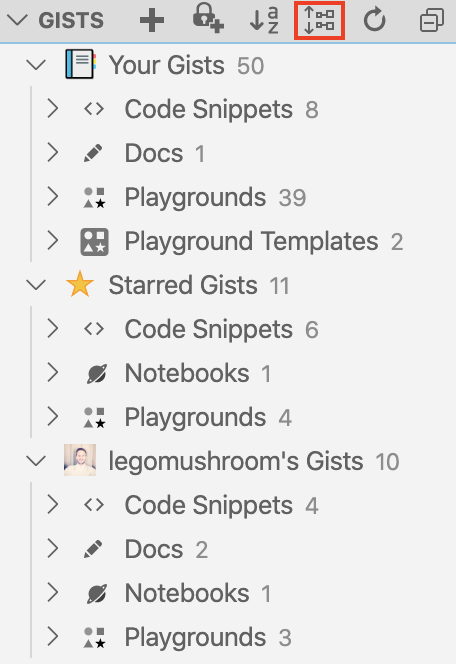
-
Added the ability for extensions to contribute custom viewers
- Added a command to submit showcase entries from the
Showcaseview
- Introduced the new
Showcaseview in the GistPad tab.
- Added support for markdown-based markup files in playgrounds. Simply rename your
index.htmlfile toindex.mdand you can write playgrounds with Markdown - Gist directories can now include spaces in their names, and playground tutorials now allow each step to include a title in their name (e.g.
1 - Intro) - Playgrounds can now consist of only a readme file, which among other thing, is useful for tutorials to include an "intro" step that doesn't actually require any code
-
Introduced support for creating directories within a gist, as well as a new setting called
GistPad > Images: Directory name, which defines the name of the directory that pasted images are uploaded to.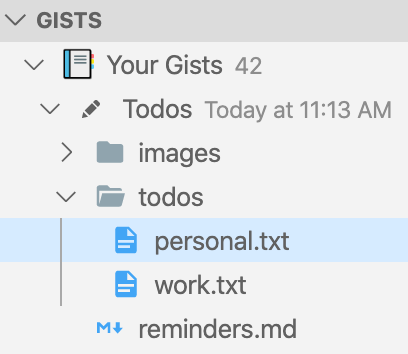
-
Introduced the concept of playground "tutorials", which allow you to create multi-step playgrounds, based on the new support for gist directories.

-
Added the
View Forkscommand to the tree view, which allows you to view a gist's forks
- Added support for creating "temporary playgrounds", that don't have a backing gist
- Added support for adding, renaming and deleting files within a temp playground
- Added the
Delete Filecommand to the editor context menu
- Added a confirmation prompt when attempting to delete gist files
- Improved the peformance of the
Copy File to Gist,Delete Gist, andOpen Gistcommands - Updated playgrounds to treat any
.mjsfile as being a JavaScript module, regardless if theplayground.jsonfile sets thescriptTypeproperty tomoduleor not. - Enabled CodePens to be opened as playgrounds, even if they only include a JavaScript file (e.g. Lines).
- Introduced the ability to add
gist:links to a playground, which will open/navigate to a file
- Introduced the concept of a playground readme, which allows you to define a readme for the playground in markdown, which is then rendered above/below the preview.
- Added the
Split Left TabbedandSplit Right Tabbedplayground layout options.
- Enabled playground's to load non-JSON files from their gist. Among other things, this supports playgrounds that need to use CSV/TSV files to load data for their visualuzations (e.g. Basic US State Map)
- Added the gist count to all top-level tree nodes
- Added the ``View Gist in Bl.ocks` command to gist nodes that represent block playgrounds.
- Added a new optional playground gallery called
Blocksto enable Bl.ocks development. - Added a JSON schema to make it easier to author
gallery.jsonfiles.
- Fixed a bug where the
Gistsview on theExplorertab wasn't properly activating the extension - Don't ask for a description when an anonymous user creates a playground.
- Allow creating temporary playgrounds without having to sign in.
- Added UI for configuring playground template galleries when creating new playgrounds
- Introduced the
BasicandLanguagestemplate galleries, which allows you to get started quickly with commonly-used web language configurations (e.g. Pug + Less + JS, HTML + SCSS + TS). - Added the
Split Bottomplayground layout mode.
- Added support for JavaScript modules, which allows you to
importother modules, using either an absolute URL, or a relative path to another JavaScript module in the gist. See an example here - Removed the default keybindings, since they were conflicting with other VS Code keybindings
- Added the
New Secret Playgroundcommand, which allows you to create playgrounds that are backed by secret gists - Introduced the concept of "playground templates", which allow you to create new playgrounds from a "standard" template (e.g. React.js, Vue), or define your own templates and then create new playgrounds from that over time
- Added the
Active Gistview that displays all of the files/actions of the currently open gist. To begin this, this only supports playgrounds, and the view shows/hides itself when you actually have a playground open. - Added the new
GistPad > Playgrounds: Include Scriptsetting, to allow indicating that you don't want ascript.jsfile for new playgrounds - Updated the
Giststree to include icons that indicate the "type" of gist (code, playground, jupyter notebook or document), and whether it's public or secret - Added an inline action to gist tree nodes that allow you to open them with a single-click
- Updated the playground auto-save feature, so that it doesn't attempt to run when you're 1) signed out, or 2) have a playground open you don't own
- Added support for Sass, in addition to the existing support for SCSS. This was primarily added for improved interop with CodePen (e.g. 3D Texbox.
- Gists can now be opened (via the
Open Gistcommand) using either theusername/idformat or any URL whose path ends with that (e.g.http://bl.ocks.org/simzou/6459889) - Added keyboard shortcuts for opening a gist and creating new public gists
- Added the
Open Gistcommand to theYour Gistsnode in theGistsview - Added the
GistPad: Refresh Gistscommand to the command palette (in addition to the title bar of theGistsview) - Added the
Copy GistPad URLcommand to gist nodes in theGistsview - Updated the
Copy File to Gistcommand to support multi-select in both theGistsview and the file explorer - Added support for
XMLHttpRequestscalls in playgrounds, inlcuding the ability to request relative paths in your Gist (e.g. US Map of Nielsen Media Markets) - Added support for referencing JavaScript and CSS files in your playgrounds via
<script />and<link />tags (e.g. Fantasy Map Generator) - Fixed the
Save Allcommand when you've edited multiple files in the same gist
- Added support for fully round-tripping external scripts/stylesheets from CodePen, and fixed a caching issue when exporting the same playground multiple times in a short timespan
- Fixed a bug with viewing starred gists, when you had a starred gist from an anonymous user
- Added the
Upload File(s)...command to gist nodes in theGistsview, which allows easily uploading one or more local files to a gist - Added the ability to star your own gists
- Updated the
Starred Gistslist to use the same display name formatting and sorting as theYour Gistsand followed user lists - Added the ability to paste images into HTML and Pug files
- Removed the
Add Active Filecommand from gist nodes in theGistsview, in favor of theCopy File to Gistcommand that's available in theExplorerview and on the editor tab's context menu
- Replaced the
Add Playground ScriptandAdd Playground Stylesheetcommands with theAdd Playground Librarycommand. Additionally, this new command has been added to the "playground" toolbar to simplify the process of adding new libraries.
- Added the
View Profile in GitHubcommand to followed user's in theGiststree view. - The tree node for followed users now displays the user's GitHub avatar, instead of the generic user icon.
- Added the
Rename Filecommand to the editor title bar, which allows easily renaming opened files, without having to find them in theGiststree and/or using workspace-mode. - Added support to the protocol handler for programatically following users (e.g.
vscode://vsls-contrib.gistfs/follow?user=lostintangent).
- Added the ability to star the gist's for user's you're following.
- Introduced the
previewplayground layout type, which allows viewing a playground's preview in full-screen mode. - Added support for opening playgrounds as workspaces, without needing to be authenticated with GitHub.
- Introduced support for defining your playground stylesheets in Less, by either renaming your
style.cssfile tostyle.lessand/or setting theGistPad > Playground: Stylsheet Languagesetting toless.
-
Added the
Change Playground Layoutcommand, as well as theGistPad > Playground: Layoutsetting, to allow developers to control the layout of the playground editors.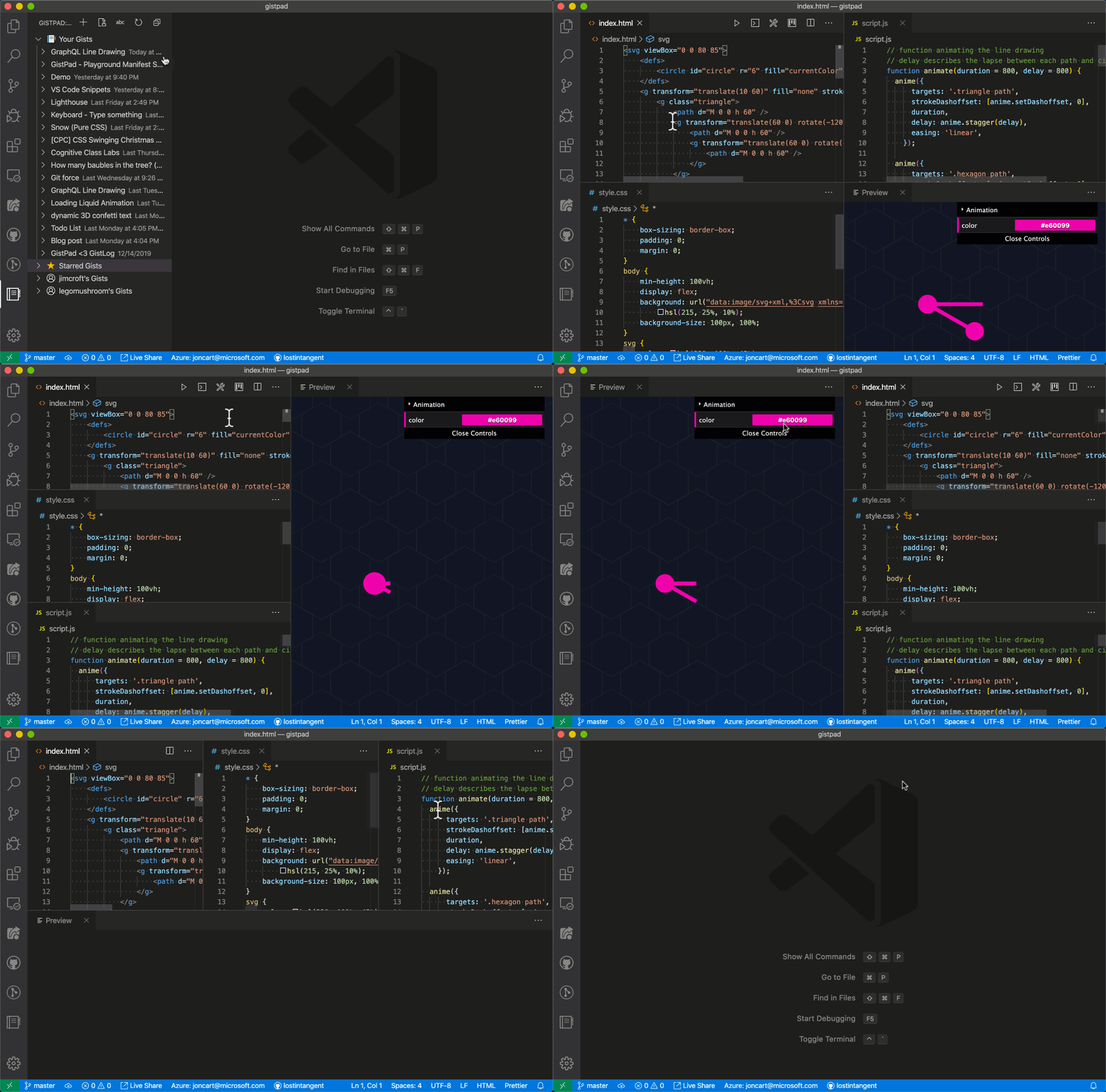
-
Added the
showConsoleandlayoutoptions to theplayground.jsonfile, to allow playgrounds to define whether they require specific layout/console behavior.
- Introduced the
Duplicate Gistcommand to theGiststree view, which allows you to create new gists, based on the contents of an existing one. - Added multi-select support to the
Giststree view, and added support for the following commands: deleting gists, unstarring gists, deleting gist files, and unfollowing users. - The
Starred Gistsnode is now hidden in the tree view unless you actually have any starred gists. Additionally, when displayed, this node is collapsed by default.
- Introduced auto-save behavior for playgrounds, that will automatically save your playground files every 30s, to ensure you don't lose any work. Additionally, introduced the
GistPad > Playground: Auto Savesetting, to disable auto-save behavior if desired.
-
Added the
Export Playground to CodePenmenu item to theGiststree, which allows you to develop a playground locally, and then export it to CodePen in order to share with the community.
-
Added support for referencing external stylsheets in a playground's
playground.jsonfile. Simply add a URL for a CSS file to thestylesproperty, and it will be injected into the preview before your playground's custom styles. -
Added the
Add Playground ScriptandAdd Playground Stylesheetcommands to the tree view, to make it easy to add new libraries to a playground without needing to actually open theplayground.jsonfile. Additionally, these commands now allow you to directly paste a URL, in addition to selecting a library from CDNJS
- Added the
Copy File to Gistcontext menu to gist file node's in the tree view, which allows easily moving files between gists
-
Added support for SCSS and Pug to playgrounds, so that you can use them as alternatives to CSS and HTML (respectively). Additionally, introduced a new
GistPad > Playground: Stylesheet LanguageandGistPad > Playground: Markup Languagesettings, which allows you to configurepugand/orscssas the default stylesheet/markup languages can for all new playgrounds. -
Improved the CodePen interop with playgrounds by adding support for pens that...
- Omit an HTML file (e.g. ZIM Tree Puzzle)
- Reference external stylesheets (e.g. Hotel Reservation Design)
- Use Babel as their scripting language. Note: Babel support is provided by simply transpiling the Babel code with TypeScript, so there may be some subtle interop problems.
- Added support for playgrounds to include relative URLs in their
index.htmlfile - Improved the CodePen interop with playgrounds by adding support for pens that omit a script file, which is neccessary for CodePen interop (e.g. Loading Liquid Animation
-
Added initial support for opening CodePens that have been exported to Gists

-
Introduced the concept of "playground libraries", which allow you to include JavaScript libraries into a playground, by simply adding their URL to the
scriptsproperty in the playground'splayground.jsonfile. -
Added support for
.jsxand.tsxfiles within a playground. If you rename yourscript.jsfile to one of these extensions, then you can include JSX in the file and it will be automatically compiled. Additionally, theGistPad > Playground: Script Languagesetting now supports two new values:javascriptreactandtypescriptreact. Finally, in order to simplify React-based playgrounds, thereactandreact-domlibraries will be automatically injected into React-based playgrounds. -
Added support for
console.login web playgrounds. When you open a playground, it will create a newGistPad Playgroundoutput pane and any calls toconsole.logwithin your playground will be written to it. By default, the console isn't automatically displayed, but you can either manually open it, or run theGistPad: Open Playground Consolecommand.
-
Introduced the
GistPad > Playground: Auto Runsetting, which allows you to control when playground code is run. Additionally, we added theGistPad: Run Playgroundcommand, which allows you to manually run a playground. -
Added the
Add Document to Gistcommand to the editor's context menu (e.g. when you right-click the editor tab).
- Added the ability to sort Gists alphabetically, in addition to the default sort behavior of updated time.
- Added support for web playgrounds without HTML and/or CSS files. If you don't need them (e.g. because you're primarily using playgrounds for JS dev), then you can delete the files from the playground and everything will still work. Additionally, you can set the
GistPad > Playground: Include StylesheetorGistPad > PlayGround: Include Markupsettings tofalsein order to suppress these files from future playgrounds. - Fixed markdown files to open in edit mode by default as opposed to preview mode.
-
Added support for TypeScript to web playgrounds. Simply rename the
script.jsfile toscript.tsand the code will be transparently compiled for you as you code. Additionally, you can set theGistPad: Playground Script Languagesetting totypescriptin order to create anscript.tsfile for all new playgrounds.
-
Introduced the concept of a Gist "Web Playground", which allows you to do rapid prototyping of web front-end code, that's backed by a Gist

-
Updated the
Delete Gistcommand, to automatically close all opened editors that were associated with the deleted gist -
Fixed a bug where the
Giststree view sometimes not rendering properly -
Fixed a bug in the
Open Gist as Workspacecommand that would open the Gist files multiple times
- Improving auth reliability, by detecting whether or not a specified token includes the
gistscope or not.
- Introduced support for SSO with the
gitCLI, when you've authenticated with github.com. To disable this, you can set the newGistPad: Git SSOsetting tofalse.
- Added the
Open Profile in GitHubcontext menu to theYour Giststree node, which allows opening your Gist profile page - Added the
Open GistLog Feedcontext menu to theYour Giststree node, which allows opening your GistLog feed page
-
Introduced support for creating GistLog posts via a new
GistPad: New GistLogcommand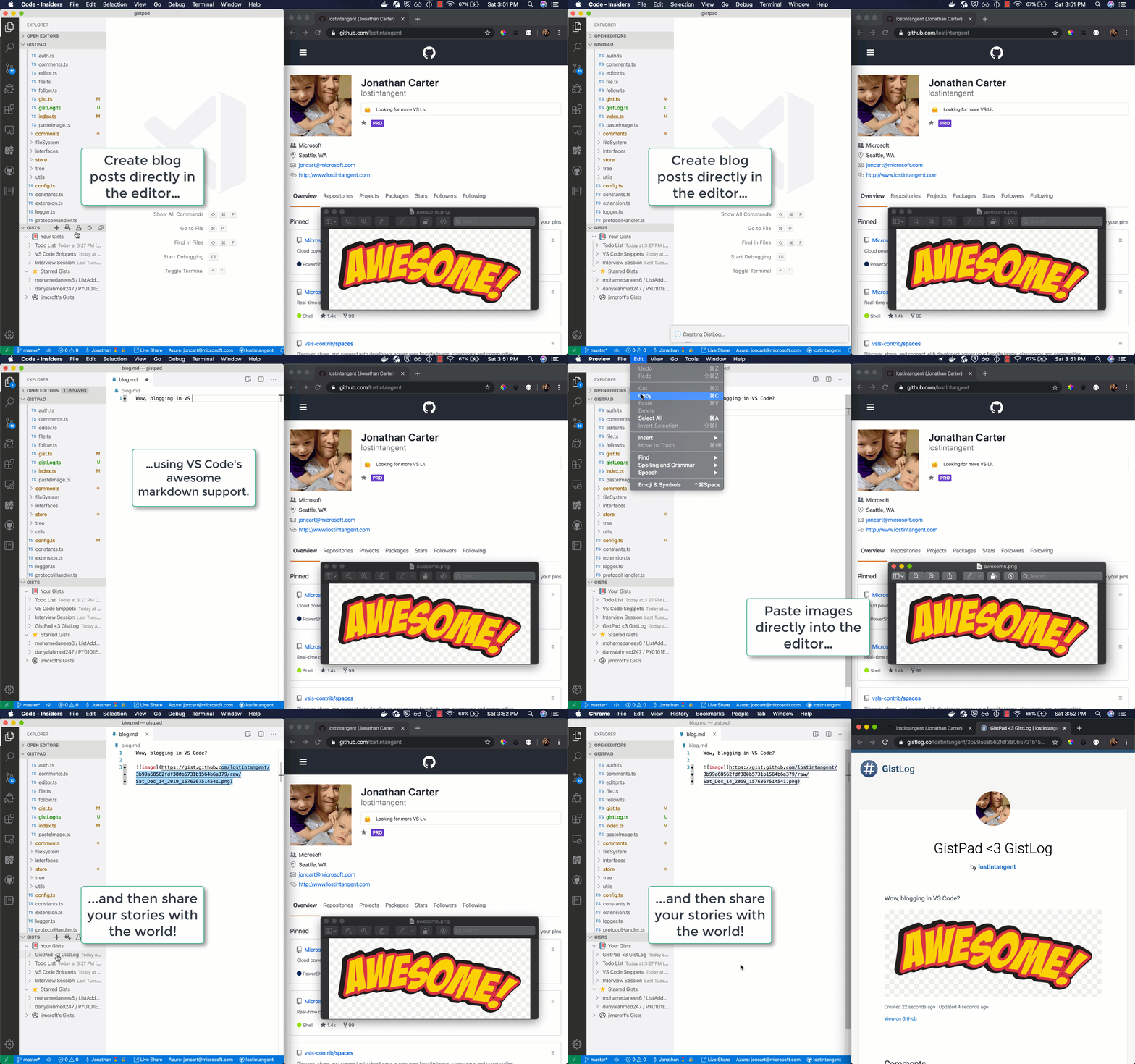
-
Added a new
Open Gist in GistLogcontext menu to gists, that allows you to view an existing Gist on GistLog -
Exposed the
New Public Gist,New Secret GistandNew GistLogcommands via the context menu on theYour Giststree node -
Introduced a new
Gistpad: Show Comment Threadconfiguration option, that allows you to configure when the Gist comment thread UI is displayed.
- Added a new
Open Gist in NbViewercontext menu to gists, that allows you to open Gists with Jupyter Notebooks in the Jupyter Nbviewer - Fixed a bug, that impacted Gist files with special characters in their name (e.g.
*,?) - Fixed a bug with comment threads, that ensure they're always displayed at the bottom of the file, even after making edits
- Added a new
Clone Repositorycontext menu to gists, that allows you to clone a gist's repository locally - Introduced a new
gistpad.apiUrlsetting, which allows users to use GitHub Enterprise servers
-
Added support for opening image files in a Gist, and viewing their preview
-
Added a new
Copy URLcontext menu item to Gist files, in order to quickly get their "raw URL" -
Add the ability to open gists with a custom protocol handler:
Using gist URL: vscode://vsls-contrib.gistfs/open-gist?url=https://gist.github.com/legomushroom/b01737ed99192dab436adea1d6d92975Using gist Id: vscode://vsls-contrib.gistfs/open-gist?id=b01737ed99192dab436adea1d6d92975
-
🖼️ Implement the
Paste Screenshotcommand that allows to paste a screenshot from your clipboard into the gist.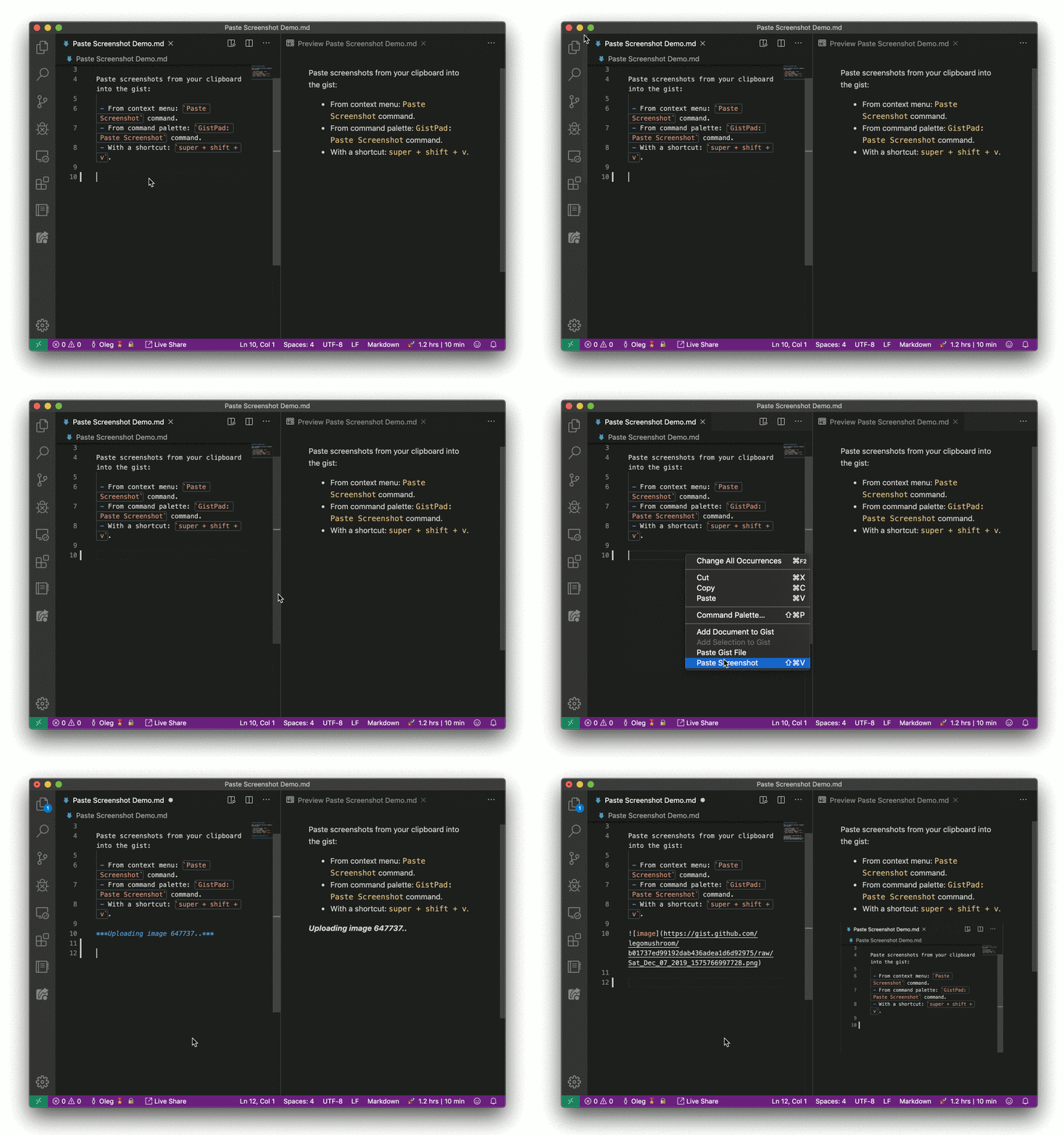
-
Removed the extension dependencies, and simply document them as being recommended in the readme
- Gists are now sorted by their last update time, not alphabetically (in both the tree view and command palette)
-
Added the ability to view, add, edit and delete comments within the editor 🎉

-
Added an extension dependency on the Markdown All in One extension
-
Allow specifying a Gist URL in addition to an ID when opening a Gist
- Added an extension dependency on the GitHub Markdown Preview extension, so that the VS Code markdown preview behaves similarly to GitHub's.
- Added a new
Paste Gist Filecommand to the editor's context menu, which allows you to paste a Gist file into the active editor
-
Introduced the ability to follow users, so you can browser/access/fork their Gists directly from the
Gistsview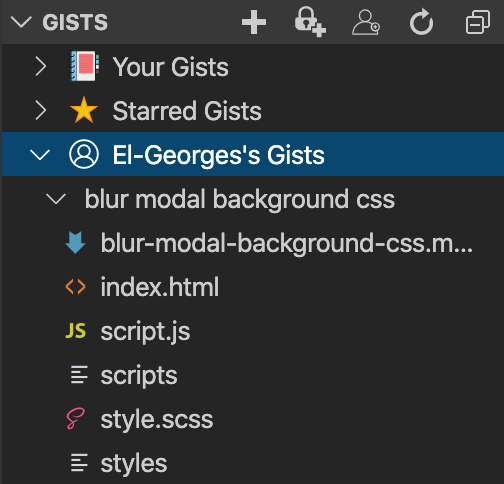
-
Added a new
Open Gist in Browsercommand to theGistsview, which opens a Gist in your default browser -
Added a new
Copy Gist URLcommand to theGistsview, which allows you to copy a Gist's URL to your clipboard
- Added a new
Add Selection to Gistcommand to the editor context menu. This allows you to add a snippet of code to a Gist, instead to an entire document (via theAdd Document to Gist). - Updated the
Gistsview to use the description as the Gist label (or it's file name if there isn't a description)
-
Added a new
Add Document to Gistcommand to the context menu of both theExplorertree and the document editor. This way you can easily add files to a gist

-
Added the
Copy Contentscommand to theGistsview, which allows you to copy file contents and paste them into other files -
Updated the
Add Active Filecommand within theGistsview to support "untitled" files
- Renamed the existing from
GistFStoGistPad, to best reflect it's purpose - Introduced a
GistPadtab, to allow you choose between managing Gists in it's own side-bar, or via theGistsview on theExplorertab - Added the
Change Descriptioncommand to theGistsview, which allows changing an existing Gist's description - Added the
Rename Filecommand to theGistsview, which allows renaming an existing file in a Gist - Added the
Add Active Filecommand to theGistsview, which allows "uploading" the active editor to the specified Gist - Remove the username prefix from the display name of your own Gists
- Added a lock icon (🔒) suffix to the display name of secret Gists
-
Introduced the
Gistsview to theExplorertab, which allows you to manage/access your Gists from a single place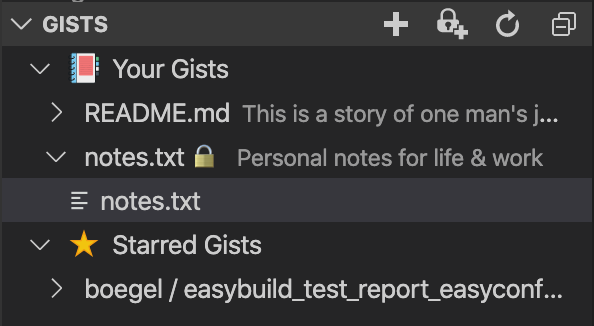
- Improved the
GistPad: Delete Gistcommand, by allowing you to select a Gist from your list of Gists, instead of just providing a Gist ID - Improved the
GistPad: Open Gistcommand, by allowing you to select one of your Gists from a list, instead of just providing a Gist ID - Updated the default behavior of opening gists, to open them as "loose files" instead of as a workspace
- Introduced a new
GistPad: Open Gist as Workspacecommand, which behaves the same asGistPad: Open Gist, but opens the Gist as a workspace instead of "loose files" - Added support for being able to seed multiple files when creating a Gist, by specifying a comma-separated list of files names
- Added a progress indicator when creating a new Gist
- Introduced a new
GistPad: Sign Incommand, to explicitly sign in to your GitHub account - When opening the files for a Gist, Markdown files are now displayed in preview mode by default
- Introduced the
GistPad: List Gistscommand, which lets you view your list of gists and then open one - Introduced the
GistPad: Starred Gistscommand, which lets you view your starred of gists and then open one
- Replaced the
GistPad: New Gistcommand with the following commands, in order to simplify Gist creation:GistPad: New Gist (Public),GistPad: New Gist (Secret)
Initial release! 🎉